


Le Pass
4.31.16K Reviews
App Specs
- Version
- 5.197.0.1799
- Updated On
- License
- Free
- Downloads
- 100,000+
- Developer
- New Orleans Regional Transit Authority
- Categories
- Maps & Navigation
- Platform
- Android
Screenshots
 Analysis by AppCompare
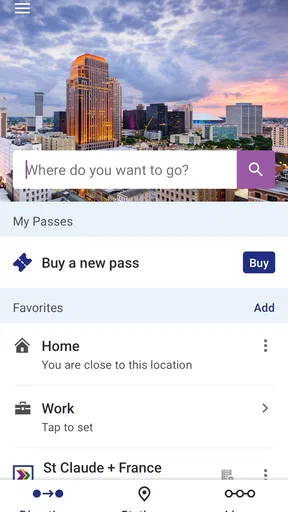
When I’m trying to get across New Orleans, I want a transit app to help me make a practical choice quickly, not turn a short trip into a research project. Le Pass is the New Orleans Regional Transit Authority’s app for planning journeys and buying passes for its buses, streetcars, and ferry. That makes it most useful when public transit is already part of your plan, whether you live in the city or are visiting and still learning how its routes fit together.
What to expect when planning a trip
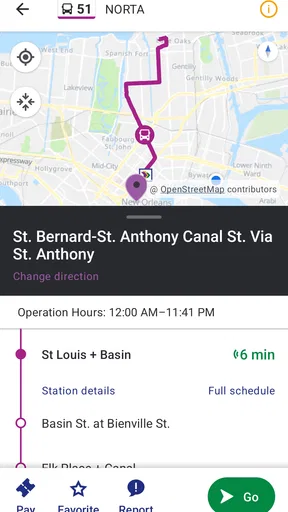
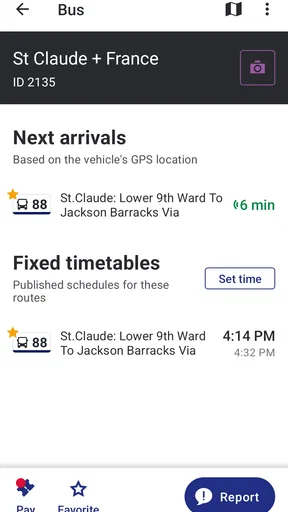
The first thing I’d keep in mind is the app’s local focus. It is not a general-purpose map for every kind of travel; its value is in helping you think through a journey using New Orleans RTA services. If you are comparing a bus with a streetcar or ferry, having those modes within one transit tool is more relevant than switching among unrelated route resources. It also gives you a place to handle pass purchases alongside planning, rather than treating those as entirely separate tasks.
That setup is especially useful before leaving home or your hotel. I’d check the intended route and fare arrangements while I still have a moment to concentrate, then keep the phone accessible for the actual trip. This small habit matters: a transit app is easier to use when you are not trying to make a first-time decision at a busy stop, with other people waiting behind you.
How it fits a real day in New Orleans
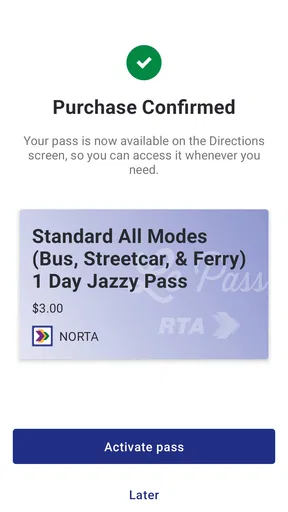
Picture a visitor heading out for the day who expects to combine a bus ride with a streetcar trip and may use the ferry as well. Rather than treating each leg as a separate outing, the app’s coverage lets that person approach the day as connected RTA travel. I’d use it to sort out the transit part before setting off, then check the plan again when deciding whether the next leg still makes sense. The pass-purchasing function is useful in the same workflow because payment preparation and route planning sit within one transit-specific app.
A less obvious benefit is that this can reduce small bits of mental bookkeeping. When I’m exploring, I would rather not remember which service I looked up in one place and where I handled the pass in another. Keeping the task centered on RTA travel can make the day feel more organized, although it does not remove the need to pay attention to the route and the circumstances around each ride.
For a routine commuter, the appeal is different. You may already know your usual bus or streetcar, so planning tools matter most when something changes in your day or you need a different combination of services. For an occasional rider, the bigger gain is having a dedicated starting point for understanding RTA travel. Neither user should assume that an app can make every on-the-ground decision for them; I’d still check signs and pay attention to service information where I board.
Where it sits among transit alternatives
Compared with a broad navigation app, Le Pass has a narrower job: it is centered on the New Orleans RTA network and also handles pass purchases. A general map may be more convenient if your journey involves walking, driving, or services beyond the RTA, because that broader scope is its strength. But when the question is specifically how to use New Orleans RTA buses, streetcars, or the ferry, a dedicated local transit app is the more natural place to begin.
Worth Reading Before You Choose

EA SPORTS FC Mobile 26 Is a Bigger Football Game, but It Takes Time

Flipboard Shows What News Apps Must Do Beyond the Feed

Switching to Android Auto Means Rethinking Your Driving Routine

Google Calendar Makes a Crowded Week Easier to Manage

Ludo King Makes the Most of the Minutes Between Plans

Baby Panda World Brings Quick Play to Modern Phones, but Its Game Library Feels Busy
I would not make it my only travel tool for a trip that includes several transport operators or lots of non-transit planning. The practical trade-off is focus: local RTA coverage keeps the app relevant to its intended job, while a broader navigation option may be better for stitching together every part of a city itinerary. If you are only walking around one neighborhood, you may not need a transit app at all. If you expect to ride RTA services, the focused approach is much more worthwhile.
Speed expectations and busy moments
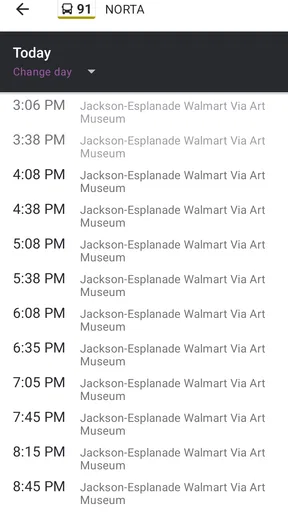
Transit apps are often opened at inconvenient times: just before leaving, while deciding between services, or when a rider wants to sort out a pass. I’d use Le Pass as a planning aid before the busiest part of a journey rather than count on any phone app to remove all last-minute uncertainty. It helps to have the relevant trip in mind before arriving at a stop, particularly if you are unfamiliar with the area or deciding how different RTA modes fit together.
For a heavy-use day with several rides, the main benefit is having the same RTA-focused place to return to for travel planning and passes. That is a sensible workflow for a visitor moving between parts of the city, but it is still worth leaving yourself time to check the details instead of opening the app only at the moment you need to board. The app’s purpose is clear; the quality of a trip still depends on the route you choose and the conditions when you travel.
If you are helping someone else plan, I’d work through the transit choices together before they head out. That gives a newer rider a chance to understand which part of the journey involves a bus, streetcar, or ferry, instead of expecting them to interpret everything in a hurry. It is a simple use case, but a useful one for visitors traveling with family or friends who do not use local transit regularly.
Getting Started with Le Pass
First things first, downloading Le Pass was a breeze. It's available on both Android and iOS, so no matter what device you're rocking, you're covered. Once installed, the app welcomes you with a sleek, modern interface that's super easy to navigate. You know how some apps bombard you with tutorials and pop-ups? Not here. Le Pass keeps it simple and lets you dive right in.
Features That Stand Out
One of the things I loved about Le Pass is its versatility. It combines travel planning with local discovery, making it a one-stop-shop for adventurers. Here’s a rundown of what impressed me the most:
- Custom Itineraries: You can create personalized itineraries by adding destinations, accommodations, and activities. It’s like having a travel assistant in your pocket.
- Local Recommendations: The app suggests popular spots and hidden gems tailored to your interests. Whether you're into dining, sightseeing, or shopping, Le Pass has got you covered.
- Offline Mode: This is a lifesaver when you're traveling abroad and want to save on data. Download your plans and maps, and access them even when you're off the grid.
User Experience
Using Le Pass feels intuitive and smooth. The app’s design is clean, with everything laid out logically. I didn’t encounter any bugs or crashes, which is always a relief. Plus, the loading times are quick, so you’re not stuck staring at a spinning wheel when you’re in a rush.
One cool feature is the real-time updates. If there are changes to your itinerary or any local alerts you should be aware of, Le Pass notifies you immediately. It's like having a well-informed travel buddy who's always got your back.
Room for Improvement
No app is perfect, right? While Le Pass has a lot going for it, there are a couple of areas that could use some polishing. For instance, the app could benefit from additional language support. Right now, it’s primarily in English, which might be a barrier for some users.
Another area for potential growth is integrating more user-generated content. It would be awesome to see more reviews and photos from fellow travelers. Imagine tapping into a community of explorers sharing their firsthand experiences!
Final Thoughts
All in all, Le Pass is a solid choice for anyone looking to enhance their travel experiences. It’s user-friendly, packed with features, and designed to make your trips smoother and more enjoyable. If you're planning a getaway or just want to discover new spots around your city, give it a whirl. You might find it becomes your new go-to travel companion.
So, have you tried Le Pass yet? What did you think? I'd love to hear your thoughts!
Who will get the most from it?
Le Pass is free, rated for Everyone, and has a 4.4 average from around 2,400 ratings, with more than 100,000 installs. Those figures suggest that it has found an audience among people looking for a local transit option, but the deciding factor for me is simpler: do you expect to use New Orleans RTA services? If yes, its specific focus and pass-purchasing role make it worth considering. If you rarely ride those services, a broader city map may be all you need.
The app was released on July 18, 2022, and its current version is 5.178.0.1749. It runs on Android 7.0 or later. Those details make it easier to judge basic compatibility, especially if you are setting up an older Android phone before traveling. On iOS, it is also available, so the choice is not limited to Android users.
One useful preparation tip is to install it and get comfortable with its transit-planning flow before the day you need to travel. If you are buying a pass, avoid leaving that task until you are already boarding or rushing to meet someone. The app brings planning and pass purchase together, but being prepared still leaves you better placed to handle an unfamiliar trip calmly.
Reliability, limitations, and the final call
My expectations for reliability are practical rather than dramatic: I want a transit app to be a dependable place to plan RTA travel and manage passes, while recognizing that a phone app cannot replace paying attention during a journey. I would keep the app updated and make route decisions with enough time to respond if my plans change. On an unfamiliar route, checking the information before setting off is a better approach than assuming that a quick glance at the last second will answer every question.
There are also clear reasons to choose something else. If your trip depends on transport outside the New Orleans RTA network, a general navigation tool or the relevant operator’s own resource may fit better. If you mainly need restaurants, attractions, or a complete vacation itinerary, Le Pass is not the tool I’d rely on for that wider job. Its usefulness comes from the transit task, not from trying to replace every travel app on your phone.
For someone who rides New Orleans buses, streetcars, or the ferry, I’d give it a place in the travel toolkit and use it to prepare rather than improvise. Its focused purpose is a strength when your plans involve RTA services, and its limits are easy to understand when they do not. I’d recommend it to local riders and visitors who want one RTA-centered place to plan and purchase passes, while suggesting that people with broader transport needs keep a general map or another operator’s tool alongside it.
Pros
- User-friendly interface enhances navigation.
- Comprehensive travel information at a glance.
- Offline access to travel documents available.
- Personalized itinerary recommendations.
- Real-time updates on travel plans.
Cons
- Limited language options for non-English users.
- Occasional glitches in booking confirmations.
- In-app ads can be intrusive at times.
- Requires constant updates for optimal performance.
- Some features locked behind a paywall.
FAQs for Le Pass
What is Le Pass and how does it work?
Le Pass is a versatile app designed to streamline access to various services and events. It allows users to store and manage digital passes, tickets, and membership cards. With a user-friendly interface, it simplifies entry processes by enabling QR code scanning and NFC technology, making it a convenient tool for both everyday use and special occasions.
Is Le Pass available for both Android and iOS devices?
Yes, Le Pass is available for download on both Android and iOS platforms. Users can find it on the Google Play Store for Android devices and the Apple App Store for iOS devices. This cross-platform availability ensures that a wide range of users can benefit from its features regardless of their device preference.
Does Le Pass require an internet connection to function?
Le Pass requires an internet connection to download and update passes, tickets, and cards. However, once these items are stored within the app, they can be accessed offline, making it convenient for users who may face connectivity issues at venues or events. This feature ensures uninterrupted access to your important digital passes.
Is my personal information secure with Le Pass?
Le Pass prioritizes user privacy and security by implementing robust encryption protocols to safeguard personal data. The app does not share your information with third parties without consent. Regular updates and security measures are in place to protect against unauthorized access, ensuring that your sensitive data remains safe and secure.
Are there any costs associated with using Le Pass?
Le Pass offers a free version with basic features suitable for most users. However, there may be in-app purchases or subscription options available for advanced functionalities. These premium features might include additional storage, enhanced security options, or exclusive access to certain events. Users are encouraged to explore these options to enhance their experience.


